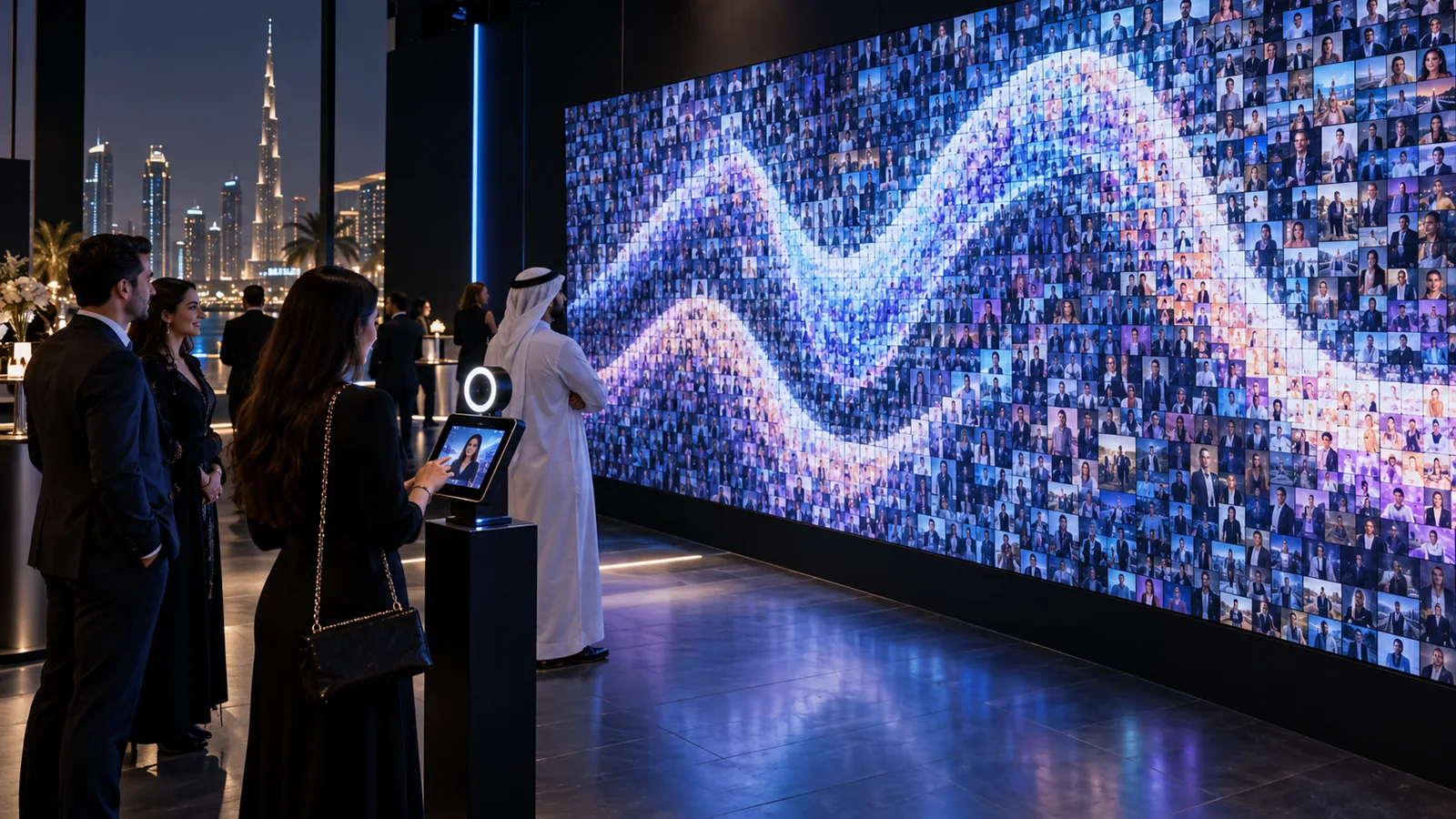
A digital mosaic wall in Dubai turns individual guest photographs into one evolving piece of branded artwork. Instead of asking visitors to simply watch content on a screen, it gives them a visible role in creating the final experience.
That difference matters at exhibitions and events. People are more likely to stop when they can understand the activity quickly, participate without complicated instructions and see their contribution become part of something larger.
The concept can be delivered as a live digital display, a physical printed photo wall or a hybrid installation combining both formats. But the technology alone does not make it successful. The experience still needs the right visitor journey, content system, moderation process and technical setup.
What is a digital mosaic wall?
A digital mosaic wall is an interactive installation that collects individual photographs and automatically arranges them into a larger master image.
Guests may take a photograph at a capture station, upload one through a QR code or submit content with assistance from a host. Mosaic software processes each approved photograph and assigns it to a suitable position based on colour, tone and composition.
From a distance, the wall reveals the main brand image. Up close, visitors can see the individual photographs that created it.
This makes the installation both personal and collective: every guest receives their own moment, while all contributions build towards one shared visual outcome.
How does a digital mosaic wall work?
Although the final result looks simple, several connected stages are working behind it.
1. The guest contributes a photograph
The experience begins with a clear invitation. A visitor may take a new photo at a branded capture point, scan a QR code and upload from their phone, or choose an image through a touchscreen interface.
The best method depends on the audience, available space and expected number of participants.
2. The image is reviewed
Submitted photographs can be checked before appearing publicly. Moderation may be handled by an operator or through a defined approval workflow.
This step is especially important at public events, exhibitions and brand activations where inappropriate, unclear or unrelated images should not reach the main display.
3. The system processes the image
Once approved, the software analyses the photograph and prepares it for placement inside the mosaic. The image may be cropped, resized and colour-adjusted so that it contributes correctly to the larger composition.
4. The photograph enters the mosaic
The processed image is assigned to one tile within the master artwork. On a digital wall, this can appear through a short animation that helps the visitor follow their photograph from submission to final placement.
5. The larger image develops throughout the event
As more people participate, the mosaic becomes increasingly detailed. This visible progress gives returning visitors a reason to look again and creates an evolving visual feature rather than a static screen.
6. The final artwork is completed
At the end of the activation, the complete mosaic can be displayed, exported for digital use, shared online or produced as a physical artwork depending on the selected format.
Digital, printed or hybrid: which format is right?
A photo mosaic does not have to be delivered in only one way.
Live digital mosaic
A digital mosaic is displayed on an LED wall, large-format screen or projection surface. New photographs appear automatically as visitors participate.
This format works well when immediate visual feedback, animation and high visibility are important. It can also support multiple upload points without requiring every participant to approach the same physical wall.
Printed photo mosaic
In a printed version, each submitted photograph is printed as a physical tile and placed onto a prepared grid. Over time, the tiles reveal the larger image.
The physical process is easy for surrounding visitors to understand and gives the activation a strong sense of progress. However, printing speed, consumables, tile placement and queue management must be planned carefully.
Hybrid mosaic experience
A hybrid installation combines digital processing with a physical printed result. Guests may first see their photograph enter a digital animation and then receive or place a printed version.
This can create a richer experience, but it also adds more operational stages. The design should only use both formats when each one contributes something meaningful to the visitor journey.
What technology is required?
A digital mosaic wall usually combines several systems rather than relying on one piece of equipment.
Depending on the format, the installation may require:
- A camera, tablet or touchscreen capture station
- A QR-based mobile upload experience
- Photo mosaic software
- Image processing and moderation controls
- A local computer or media server
- A large-format LED wall, display or projection system
- Reliable networking and backup connectivity
- Power distribution and protected cabling
- A photo printer for physical or hybrid mosaics
- An operator interface for monitoring submissions
- Spare devices and a recovery plan
Stedder Technology develops and integrates the interactive experience, including the user journey, content flow and system behaviour. When required, event-ready displays and supporting AV hardware can be provided through AVRIX.
The two layers should still be planned together. The display dimensions affect the master artwork, the content resolution affects visual quality, and the expected participation level affects processing, networking and operational requirements.
Where does a digital mosaic wall work best?
The format is flexible, but it performs best when participation supports a larger event message.
Exhibitions and trade shows
Visitors can contribute photographs that gradually reveal a product, campaign image or brand message. The changing wall also gives the stand a visible activity that can attract attention from the aisle.
Corporate events
Employee photographs can form a company milestone, anniversary image, leadership message or representation of a shared organisational goal.
Product launches
The final mosaic may reveal the product, campaign visual or launch identity while allowing guests to participate in the reveal.
Brand activations
A digital mosaic can connect individual audience moments with a collective campaign. It works particularly well when the brand wants content that can continue to be used after the event.
Conferences and award ceremonies
Attendee photographs can become part of an event identity, sponsor visual or closing-stage reveal.
Public and community campaigns
The format can represent participation across a city, organisation or social initiative, provided that consent and moderation are handled properly.
Why do guests engage with the experience?
The strongest reason is not the display technology. It is the simple promise that the visitor will become part of the final artwork.
Participation usually improves when:
- The invitation can be understood within a few seconds
- Taking or uploading a photograph is easy
- Guests can see where their image appears
- The wall changes visibly during the event
- The final artwork connects with the event theme
- The interaction does not demand excessive personal information
- A host is available without making the process feel forced
The experience should not begin with a long explanation. A visitor should be able to understand what to do, what will happen next and why their participation matters.
What affects the cost of a digital mosaic wall in Dubai?
There is no useful fixed price for every digital mosaic wall because the same idea can involve very different levels of technology, content and event operation.
The main cost factors include:
Type of mosaic
A digital-only system usually has different production requirements from a printed or hybrid installation. Adding physical printing introduces printers, consumables, placement grids and additional operators.
Display size and format
An existing screen can sometimes be used, while other projects require a dedicated LED wall, touchscreen, projection system or custom physical structure.
Number of capture points
One hosted camera station is simpler than multiple kiosks, roaming capture devices and guest uploads operating simultaneously.
Customisation
A standard mosaic flow requires less development than a fully branded interface with custom animations, data capture, multilingual instructions and personalised outputs.
Event duration
A one-evening corporate event and a multi-day exhibition have different staffing, equipment and technical-support requirements.
Expected participation
The system must be designed for realistic visitor volume. Higher participation may require additional capture points, faster moderation and more operational support.
Venue and installation requirements
Access timings, power, rigging, networking, structure, screen positioning and dismantling schedules can all affect delivery.
A reliable estimate can be prepared once the event date, venue, audience size, display format and desired visitor journey are clear.
What should be planned before production begins?
Before designing the interface or confirming the hardware, the project team should answer a few practical questions:
- What should the final mosaic reveal?
- Why would a visitor want to participate?
- Will guests take new photos or upload existing ones?
- Is moderation required?
- Will the result be digital, printed or hybrid?
- How many people are expected to participate?
- How long should each interaction take?
- Where will visitors queue or gather?
- How will consent be communicated?
- What happens if the internet connection becomes unstable?
- Who will operate the experience?
- How will the final artwork be used after the event?
These decisions shape the experience more than visual effects added at the end.
Common mistakes that reduce participation
A digital mosaic can look impressive in a proposal and still struggle during the live event if the operating details are overlooked.
Common problems include:
- Placing the participation point where visitors cannot find it
- Using instructions that take too long to read
- Asking guests to complete an unnecessary registration form
- Depending entirely on venue internet
- Allowing moderation to delay every submission
- Positioning the main wall where participants cannot see the result
- Designing the master image with insufficient contrast
- Using a display that is too small for the viewing distance
- Failing to prepare the booth or event team
- Testing the software without testing the complete visitor journey
The safest approach is to test the experience exactly as a guest will use it—from first seeing the invitation to finding their photograph inside the mosaic.
Does a digital mosaic require an internet connection?
Not always.
A QR upload experience normally needs a reliable network path, but the central mosaic application and locally connected capture stations can often be designed to operate within a controlled local system.
The correct approach depends on the event. Where internet access is essential, backup connectivity should be considered. Where it is not essential, local processing can reduce unnecessary risk.
The decision should be made during technical planning rather than after arriving at the venue.
How should photo moderation and privacy be handled?
Visitors should understand how their photograph will be used before submitting it.
The experience may require:
- Clear consent language
- A defined moderation workflow
- Limited collection of personal information
- Secure access to submitted photographs
- A retention or deletion policy
- Approval before images appear publicly
- Separate consent for post-event marketing use
Collect only the information that genuinely supports the experience. A photo mosaic does not automatically need a long lead-generation form attached to every submission.
Is a digital mosaic right for every event?
No.
A mosaic works best when collective participation connects naturally with the event story. It can be effective when the goal is to celebrate a community, reveal a shared image, create a visual record or encourage visitors to contribute.
If the requirement is simply to play branded videos on a large screen, a conventional content display may be clearer and more cost-effective.
Technology should support the purpose of the event, not make the interaction more complicated than it needs to be.
Planning a digital mosaic wall in Dubai
A successful mosaic experience brings together a simple invitation, reliable technology and a final image that is worth creating.
Start by defining what the collective artwork should represent. Then decide how guests will participate, how their photographs will be handled and how the growing mosaic will remain visible throughout the event.
Stedder Technology designs and delivers digital mosaic experiences, interactive installations and custom content systems for exhibitions, brand activations and corporate events across the UAE.
Explore our work or discuss your upcoming event with our team to plan an experience around your audience, venue and objectives.
Frequently asked questions
How long does a digital mosaic take to complete?
It depends on the number of tiles in the master image and the expected participation level. The artwork can be designed to reveal progressively throughout an event rather than waiting for every possible tile to be filled.
Can guests upload photographs using a QR code?
Yes. Guests can scan a QR code and submit a photograph from their phone, provided the upload journey and event connectivity are planned correctly.
Can photographs be moderated before appearing?
Yes. A moderation step can allow an operator to review and approve submissions before they reach the public display.
Can a digital mosaic use an LED wall?
Yes. LED walls are suitable for large, highly visible installations. Screen resolution, aspect ratio, viewing distance and content design should be coordinated before production.
Can the completed mosaic be printed?
Yes. The final artwork can be exported for suitable print or digital applications, subject to the resolution and usage requirements defined during planning.
How much does a digital mosaic wall cost in Dubai?
The cost depends on the display format, number of capture points, software customisation, event duration, expected participation and level of on-site support. A useful quotation requires the event date, venue, audience estimate and desired experience format.